Best AI Toys for Kids Who Love Robots
Kid-friendly AI and robot toys that balance fun with real thinking skills.
Snapshot
| Toy | Age | Price | Best for | Link |
|---|---|---|---|---|
| #1 Makeblock Codey Rocky | 6+ | CAD $170–$230 | Beginner robotics and block-based coding | Check Price |
| #2 Teach Tech Mech-5 Mechanical Coding Robot | 8+ | CAD $45–$70 | Screen-free mechanical coding with visible command buttons | Check Price |
| #3 Thames & Kosmos Kids First Robot Factory | 5+ | CAD $40–$60 | Story-led mechanical robot building for younger STEM kids | Check Price |
| #4 Educational Insights Artie 3000 The Coding Robot | 7+ | CAD $60–$80 | Drawing-based robot coding with block and text pathways | Check Price |
Affiliate links. Prices can change.
Robot-loving kids need interactive toys that build thinking, not just novelty reactions.
The best AI and robot toys for kids are not the ones that do the most by themselves. They are the ones that invite a child to predict, program, build, test, repair, and try again. A robot that only performs canned tricks can be fun for a weekend, but it may not teach much once the surprise wears off.
For families, the real question is fit. Some children want a cute companion that reacts to them. Some want a robot they can code. Some want to build the machine first so they understand how it works. This guide focuses on robot toys that are practical, repeatable, and useful beyond the first week.
Makeblock Codey Rocky
Reliable engagement, low setup friction, and strong replay value for real family routines.
If you want a broader category overview, start with AI Toys for Kids. If your child is specifically asking for robots, this list narrows the decision to options with stronger hands-on value.
What to Look For
- A real child action. The child should code, build, arrange, debug, draw, test, or make a decision. Watching a robot perform is not enough.
- Fast first success. A robot toy should do something satisfying in the first session, even if deeper learning takes longer.
- Clear progression. Good robot toys have a next step after the first trick: harder routes, new commands, extra builds, or more complex programs.
- Manageable setup. Apps, charging, calibration, and tiny parts can all become friction. Choose the level your household will actually support.
- Age-appropriate frustration. A little debugging is useful. Constant adult rescue is not.
For younger children who are new to coding, also compare Best Coding Toys for Beginners Age 6 to 8 and Best First Robot Toys for Curious Kids.
Our Top 6 Picks
Makeblock Codey Rocky
Beginner robotics and block-based coding
Pros
- ✓ Real coding pathway
- ✓ Strong classroom reputation
- ✓ Good STEM progression
Cons
- ✗ Higher price point
- ✗ Needs setup help for younger kids
- ✗ Not ideal for quick casual play
Screen-free mechanical coding with visible command buttons
Pros
- ✓ No app required
- ✓ Mechanical coding is easy to explain
- ✓ More unusual than standard coding robots
Cons
- ✗ Build setup required
- ✗ Not ideal for impatient kids
- ✗ Mechanical actions are limited
Story-led mechanical robot building for younger STEM kids
Pros
- ✓ Good younger robot alternative
- ✓ Builds several models
- ✓ Story manual reduces intimidation
Cons
- ✗ Mechanical, not programmable
- ✗ Parts need sorting
- ✗ May need adult build help
Drawing-based robot coding with block and text pathways
Pros
- ✓ Real coding payoff
- ✓ Creative drawing output
- ✓ Multiple coding modes
Cons
- ✗ Needs a device
- ✗ Older beginner fit
- ✗ Requires paper and marker setup
Expressive interactive robot play and social-emotional engagement
Pros
- ✓ High engagement factor
- ✓ Expressive reactions
- ✓ Strong novelty for smart-toy category
Cons
- ✗ Expensive for a companion toy
- ✗ Lower direct coding depth
- ✗ Can become novelty-only for some kids
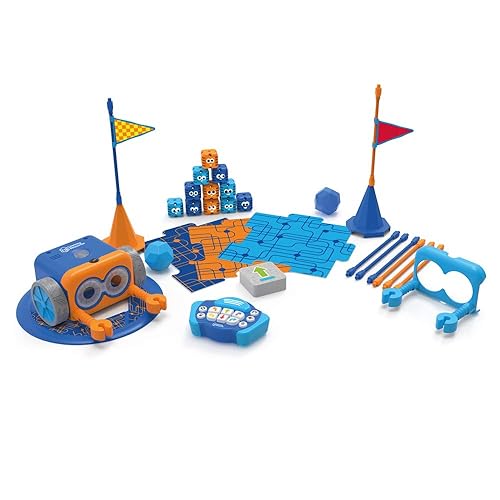
Screen-free coding for young beginners
Pros
- ✓ No screen required
- ✓ Fast feedback
- ✓ Great for beginners
Cons
- ✗ Higher price
- ✗ Can need setup help
- ✗ Small parts
Why These Picks Made the List
Makeblock Codey Rocky
Makeblock Codey Rocky is the strongest fit for kids who love robots and are ready for an actual coding pathway. It gives the child a character-like robot, but the deeper value is in block-based programming, sensor play, movement commands, and repeatable problem-solving. The child can make something happen, notice what went wrong, change the program, and run it again.
This is a better pick for families who are willing to help with setup at first. Younger kids may need an adult to handle the app, updates, or first few lessons. That adult involvement is not wasted if it leads to independent experimenting later. It is less ideal if you need a five-minute, no-device distraction toy.
Teach Tech Mech-5 Mechanical Coding Robot
Teach Tech Mech-5 is a good choice when you want coding concepts without an app. The child builds the robot and uses mechanical coding buttons or cams to determine movement. That makes commands visible in a way that many kids can understand: change the physical sequence, change what the robot does.
The build is part of the value, but also the main watch-out. An impatient child may want the robot to work immediately and get frustrated before the learning starts. This toy is best for kids who like construction, instructions, and mechanical cause-and-effect. For a direct comparison, see Mech-5 vs Botley for Screen-Free Coding.
Thames & Kosmos Kids First Robot Factory
Kids First Robot Factory is for younger robot fans who are not ready for full programming. It is more of a mechanical building kit than an AI toy, but that can be a strength. A 5- or 6-year-old can see that robots are made of parts, movement systems, and choices, not magic.
The story-led manual helps reduce intimidation. Instead of presenting the kit as an engineering lesson, it gives the child a reason to build different robot models. Expect some adult help with sorting and assembly. If your child mainly wants an autonomous robot companion, this will feel too construction-heavy. If they want to make robots, it is a stronger fit than many flashy electronic toys.
Educational Insights Artie 3000 The Coding Robot
Artie 3000 stands out because the output is visible on paper. The robot draws what the child programs. That gives coding a creative payoff: a line, shape, pattern, or picture. For some kids, that is more motivating than making a robot drive around the floor.
Artie is best for older beginners who can tolerate setup: a device, paper, markers, and enough space for the robot to draw. It can frustrate children who expect perfect art right away, but that imperfection is also the lesson. Debugging a drawing forces the child to think about direction, distance, sequence, and precision.
Eilik Interactive Robot Companion
Eilik is the most companion-like option here. It is expressive, reactive, and immediately engaging. For a child who loves robot personalities, facial expressions, and social interaction, it may get more daily attention than a coding kit.
The tradeoff is learning depth. Eilik can support imaginative play, emotional engagement, and curiosity about interactive machines, but it is not the best choice if your main goal is programming skill. It is also expensive for a toy that may become novelty-only if your child prefers building or coding. Treat it as a companion robot first, not as a STEM curriculum.
Botley 2.0 by Learning Resources
Botley 2.0 remains one of the easiest robot toys to recommend for younger beginners because it is screen-free and gives fast feedback. Children enter commands, watch Botley move, then adjust the sequence. That loop is simple, but it teaches planning, order, debugging, and spatial reasoning.
Botley is especially useful for kids who are not ready for apps or typing. It can be used on the floor with obstacle courses, cards, and simple challenges. The limitations are price, pieces, and eventual ceiling. A child who races through the basic commands may outgrow it, but for first coding confidence it is still strong. For more context, see Botley vs Snap Circuits for Kids and Alternatives to Botley for Beginner Coding Kids.
How to Choose by Child Type
For a child who loves coding and systems, start with Makeblock Codey Rocky. It has the best long-term pathway and the strongest bridge from toy robot to real programming concepts.
For a child who loves building, choose Teach Tech Mech-5 or Kids First Robot Factory. The first is better for older kids who can handle a more technical build; the second is friendlier for younger robot fans.
For a child who loves art, Artie 3000 is the most distinctive option. Drawing gives the code a visible purpose and can keep creative kids engaged longer.
For a child who loves cute robot personalities, Eilik is the emotional pick. Just be honest that you are buying engagement and companionship more than coding depth.
For a child who needs screen-free first coding, Botley 2.0 is the safer starting point. It is not the most advanced robot, but it makes the command-and-result loop easy to understand.
Want better toy picks without the research rabbit hole?
Short, practical recommendations by age, need, and budget.
Practical Setup Tips
1) Test the first session before gifting it cold
Charge batteries, install apps, check marker ink, sort pieces, and skim the instructions before the child opens the toy. Robot disappointment often comes from adult setup friction, not from the toy itself.
2) Start with one tiny challenge
Do not introduce every feature on day one. Ask the robot to move to a book, draw a square, avoid a cup, or perform one simple route. A small success creates more confidence than a chaotic feature tour.
3) Keep robot parts in one labelled container
Robot toys lose value fast when sensors, cards, markers, chargers, or small pieces disappear. Storage is not a boring detail; it is part of whether the toy gets used again.
4) Rotate between robot play and open-ended building
Robot-loving kids often benefit from non-electronic engineering too. Pair robot toys with Best Building Toys Beyond Lego or Best STEM Toys for Kids Who Hate Worksheets so the child is not only pressing buttons.
FAQ
Are AI robot toys safe for younger kids?
Choose by the actual toy, not the marketing word "AI." Look for age range, small parts, app requirements, microphones/cameras, and whether the child can use it without sharing unnecessary data. Many robot toys are really coding or interactive toys, not open-ended AI systems.
Do kids need a tablet or computer for these robots?
Some do and some do not. Makeblock Codey Rocky and Artie 3000 use devices for deeper coding. Botley and Mech-5 are stronger screen-free options. Check this before buying if you want a no-screen routine.
What if my child gets bored quickly?
Choose the toy with the clearest progression. Coding routes, drawing challenges, mechanical builds, and obstacle courses all extend replay better than canned reactions. Also keep sessions short at first so the child leaves wanting another challenge.
Is a companion robot better than a coding robot?
Only if companionship is the goal. A companion robot can be delightful, but it usually has less STEM depth. If you want thinking skills, prioritize toys where the child controls, builds, or debugs the outcome.
Related reads
- AI Toys for Kids
- Educational Gadgets for Kids
- Best Robot Toys for Kids
- Best Smart Toys for Kids New to Coding
- Best Smart Toys with Real Learning Value
If You Can Only Buy One
Makeblock Codey Rocky.
It gives the best balance of robot appeal, real coding progression, and long-term STEM value for families who can support the initial setup. If you need a screen-free or younger-child option, choose Botley 2.0 instead.
Want better toy picks without the research rabbit hole?
Get concise recommendations by age, need, and budget.
Where to go next
By age
Best Toys for 4-Year-Olds (Learning Through Play) (2026)
Keep the recommendations age-appropriate for your kid’s stage.
By need
Gifts for Neurodivergent Kids: A Parent's Guide (2026)
Jump to picks focused on ADHD, sensory, and regulation support.
By budget
Best Gifts for Kids Under $25 (2026)
Compare strong options in lower price brackets before you buy.
Related Articles
Sphero indi vs Code & Go Robot Mouse for First Robots
A beginner robot comparison for families choosing between tile-based and maze-based robot play.
Read more →
Best First Robot Toys for Curious Kids
Beginner robot toys for kids who like cause-and-effect, simple commands, and playful problem solving.
Read more →
Robot Factory vs Code & Go Robot Mouse for Younger Kids
A parent-friendly comparison between story-led robot building and simple sequencing play.
Read more →