Best Creative Tech Toys for Kids
Creative-meets-tech toys that let kids build, test, and redesign their own ideas.
Snapshot
| Toy | Age | Price | Best for | Link |
|---|---|---|---|---|
| #1 KiwiCo Tinker Crate (Subscription) | 9+ | CAD $25–$45/month | Monthly project-based STEM learning | Check Price |
| #2 LEGO Mindstorms Robot Inventor | 10+ | CAD $360–$490 | Advanced build-and-code projects | Check Price |
| #3 GraviTrax Starter Set | 8+ | CAD $55–$85 | Physics through play | Check Price |
| #4 Snap Circuits Jr. SC-100 | 8+ | CAD $45–$70 | Hands-on logic and electronics | Check Price |
Affiliate links. Prices can change.
The strongest tech learning usually starts with open-ended building, not instructions-first play.
Creative tech toys are useful because they turn screens, circuits, blocks, magnets, and motion into something kids can change with their own hands. The goal is not to buy the flashiest gadget. It is to find a toy that gives a child a clear idea, quick feedback, and enough room to try again when the first version does not work.
KiwiCo Tinker Crate (Subscription)
Reliable engagement, low setup friction, and strong replay value for real family routines.
This guide focuses on toys that help kids build, test, redesign, and make something visible. Some are screen-free. Some introduce coding. Some are classic construction toys that work beautifully as a first design lab. If you want more explicitly screen-based options, compare this with our guide to AI toys for kids and educational gadgets for kids.
Quick Answer
For most families, KiwiCo Tinker Crate is the easiest creative tech pick because the projects arrive with a clear purpose, enough structure to prevent overwhelm, and a satisfying finished build. For kids who want deeper robotics, LEGO Mindstorms Robot Inventor has more runway but also a higher cost and setup burden. For younger or more regulation-sensitive kids, Magna-Tiles and LEGO Classic may be the better first step because they build the same design thinking without an app or a long instruction booklet.
What Counts as a Creative Tech Toy?
A good creative tech toy does at least two of these things:
- lets kids build something physical
- shows cause and effect quickly
- supports iteration instead of one-and-done assembly
- introduces coding, engineering, physics, electronics, or design thinking
- leaves room for a child to personalise the outcome
That last point matters. A kit that only says "follow steps 1 to 47" may still teach patience, but it is not always creative. The best toys on this list give kids a framework, then let them make decisions: change the track, redesign the robot, rebuild the tower, add a circuit, or solve the same challenge a different way.
What to Look For
- Fast entry. If setup is complicated, attention disappears before the learning starts.
- Clear feedback. Kids stay engaged when they can see progress quickly.
- Replay value. Good toys survive past the novelty spike.
- Room for redesign. Creative tech should reward trying again, not punish mistakes.
- Manageable cleanup. A toy that needs 30 minutes of sorting after every session will not become a daily driver.
- Age-fit challenge. The best pick should feel slightly stretching, not constantly frustrating.
Our Top Picks

Monthly project-based STEM learning
Pros
- ✓ New project cadence
- ✓ Builds confidence
- ✓ Good instructions
Cons
- ✗ Subscription cost
- ✗ Waiting between crates
- ✗ Some projects need help
KiwiCo Tinker Crate is the best fit for kids who like making something real but do better when the project is scoped for them. The advantage is the balance: enough instruction to get started, enough engineering to feel meaningful, and enough variety that it does not become the same build every month.
It works especially well for families who want STEM depth but do not want to research a new project every weekend. The downside is that it is still a subscription. If your child only wants to build once in a while, a one-time kit may be smarter.
Advanced build-and-code projects
Pros
- ✓ Deep technical depth
- ✓ High replay value
- ✓ Strong coding runway
Cons
- ✗ Expensive
- ✗ Large time commitment
- ✗ Steeper learning curve
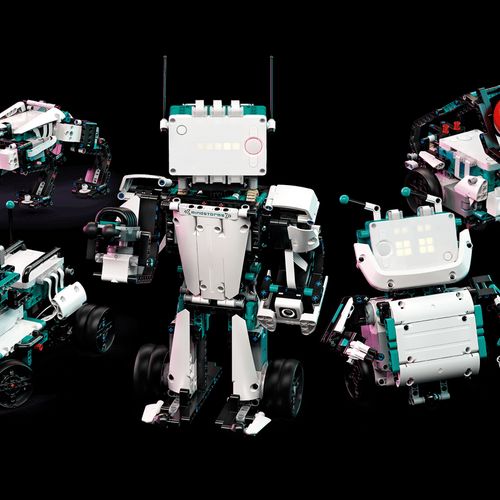
LEGO Mindstorms Robot Inventor is for the child who wants a real robotics runway. It is not a casual rainy-afternoon toy. It asks for patience, space, and a willingness to debug, but it gives kids a serious build-code-test loop.
This is the strongest pick for older kids who already enjoy LEGO, coding toys, or robot challenges. If your child is still building tolerance for frustration, start with a simpler robot from our best robot toys for kids guide before jumping into a large Mindstorms-style system.
GraviTrax Starter Set
Physics through play
Pros
- ✓ Strong experimentation loop
- ✓ Visual cause/effect
- ✓ Expandable
Cons
- ✗ Needs floor/table space
- ✗ Pieces can be lost
- ✗ Best with a clear build area
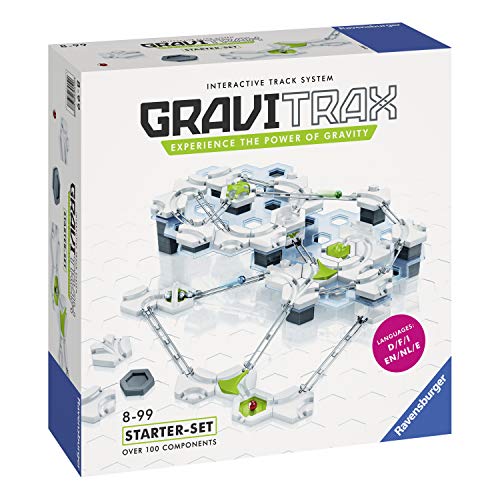
GraviTrax is creative tech without a screen. Kids build a marble run, test it, watch the failure point, and then adjust height, speed, direction, or timing. That visible feedback is what makes it so useful.
It is a good bridge for kids who like construction but are not ready for coding. The main parent job is containment: use a table, tray, or defined floor mat so pieces do not spread across the whole room.
Snap Circuits Jr. SC-100
Hands-on logic and electronics
Pros
- ✓ Clear challenge progression
- ✓ High educational value
- ✓ Strong replay
Cons
- ✗ Can frustrate younger kids
- ✗ Needs organization
- ✗ Best with guidance early
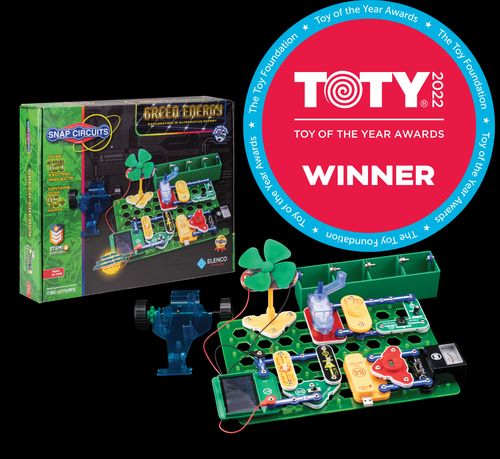
Snap Circuits Jr. is one of the clearest ways to show kids that electronics are systems, not magic. The snap-together pieces reduce the friction of wires and tools, while the projects still teach sequence, connection, polarity, and troubleshooting.
It is best when an adult helps with the first few builds, then gradually steps back. If a child sees every mistake as failure, frame it as detective work: "Where did the signal stop?" That turns frustration into a solvable problem.
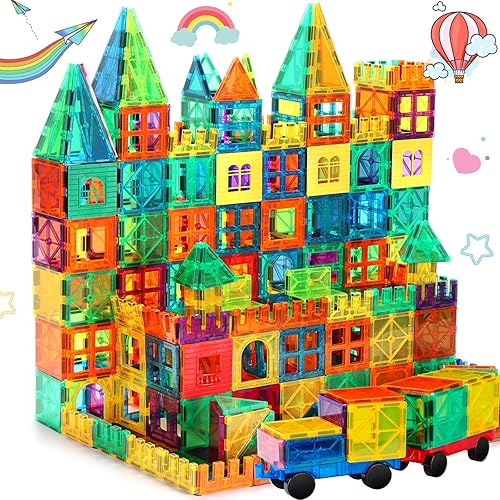
Open-ended building and creative focus
Pros
- ✓ Quiet play
- ✓ Long replay value
- ✓ Works solo or together
Cons
- ✗ Higher upfront cost
- ✗ Pieces scatter
- ✗ Needs storage bin
Magna-Tiles are not electronic, but they belong here because they build the foundations of engineering: structure, balance, symmetry, planning, and revision. They are also much easier for younger kids than most coding toys.
For families with mixed ages, Magna-Tiles are often the safest shared creative tech-adjacent toy. A preschooler can build houses and towers while an older sibling experiments with stronger bridges or marble-run add-ons.
Structured creativity that scales with age
Pros
- ✓ Huge replay value
- ✓ Scales with age
- ✓ Great imagination tool
Cons
- ✗ Cleanup friction
- ✗ Stepping hazard
- ✗ Can overwhelm if too many pieces out
LEGO Classic is still one of the best low-tech creative systems because it scales. A younger child can copy simple models. An older child can design vehicles, machines, pretend gadgets, or prototypes for a bigger build.
The key is not dumping every brick at once. Put a small tray of pieces out, give a simple prompt, and keep the rest stored. If your child needs more variety without buying a specialized kit, see alternatives to LEGO Classic for kids who need variety.
How to Choose by Child
For the kid who loves instructions
Choose KiwiCo, Snap Circuits, or LEGO Mindstorms. These kids often like having a visible goal and may feel proud when they complete a defined build.
For the kid who resists instructions
Choose GraviTrax, Magna-Tiles, or LEGO Classic. Start with a challenge prompt instead of a manual: "Can you make a bridge that holds three books?" or "Can the marble reach the cup without falling?"
For the kid who gets frustrated quickly
Start with fast-feedback toys. Magna-Tiles, GraviTrax, and simple LEGO prompts make it easier to recover from mistakes. Save longer electronics or robotics projects for a calm weekend block.
For the kid who wants a screen
Use the screen as a tool, not the reward. Robotics and coding toys are best when the app helps the child make something happen in the physical world.
Want better toy picks without the research rabbit hole?
Short, practical recommendations by age, need, and budget.
Practical Setup Tips
1) Keep only one creative tech system out at a time
Creative toys can become clutter quickly. Pick one system for the week and store the rest. Fewer pieces usually mean deeper play and less parent cleanup.
2) Use short build blocks
Try 20 to 40 minutes, depending on age. Stop while the child still has energy, not after everyone is irritated.
3) Make a "parking tray"
For multi-day builds, use a tray, bin lid, or small table where unfinished work can stay intact. This prevents the child from feeling like every session has to end with a completed project.
4) Praise the redesign, not just the result
Creative tech is about iteration. Say, "You changed the track and made it work," or "You found the broken connection," instead of only praising the final model.
FAQ
Are creative tech toys only for older kids?
No. Younger kids can build creative tech foundations with magnetic tiles, LEGO, and simple cause-and-effect builds. Save full robotics or circuits for kids who can handle longer sequences and some troubleshooting.
Do kids need a tablet or computer for these toys?
Not always. GraviTrax, Snap Circuits, Magna-Tiles, and LEGO Classic can teach systems thinking without a device. Robotics toys add more coding depth, but they also add setup friction.
What if my child only follows the instructions once?
That is normal. After the first build, give a remix prompt: make it taller, faster, quieter, stronger, or easier for a younger sibling to use. The second version is where much of the real learning happens.
Which pick has the best long-term replay value?
LEGO systems and Magna-Tiles usually have the longest open-ended replay. KiwiCo has strong novelty because new projects arrive, while Mindstorms has the deepest technical runway for a committed older child.
Related reads
- AI Toys for Kids
- Educational Gadgets for Kids
- Best Robot Toys for Kids
- Best STEM Toys Under $40 for Kids
- Alternatives to LEGO Classic for Kids Who Need Variety
If You Can Only Buy One
KiwiCo Tinker Crate (Subscription) is the best one-pick choice for most older kids because it combines creative building, clear instructions, and real STEM payoff without asking parents to design every project from scratch.
For younger kids, choose Magna-Tiles or LEGO Classic first. The learning is less obviously "tech," but the design thinking is real, and the play is easier to repeat on ordinary weekdays.
Want better toy picks without the research rabbit hole?
Get concise recommendations by age, need, and budget.
Where to go next
By age
Best Toys for 4-Year-Olds (Learning Through Play) (2026)
Keep the recommendations age-appropriate for your kid’s stage.
By need
Gifts for Neurodivergent Kids: A Parent's Guide (2026)
Jump to picks focused on ADHD, sensory, and regulation support.
By budget
Best Gifts for Kids Under $25 (2026)
Compare strong options in lower price brackets before you buy.
Related Articles

Sphero indi vs Code & Go Robot Mouse for First Robots
A beginner robot comparison for families choosing between tile-based and maze-based robot play.
Read more →
Best First Robot Toys for Curious Kids
Beginner robot toys for kids who like cause-and-effect, simple commands, and playful problem solving.
Read more →
Robot Factory vs Code & Go Robot Mouse for Younger Kids
A parent-friendly comparison between story-led robot building and simple sequencing play.
Read more →