Botley vs Snap Circuits: Which Is Better for Kids?
A practical side-by-side comparison to choose between Botley and Snap Circuits based on age, learning style, and budget.

Snapshot
| Toy | Age | Price | Best for | Link |
|---|---|---|---|---|
| Snap Circuits Jr. SC-100 | 8+ | CAD $45–$70 | Hands-on logic and electronics | Check Price |
| Botley 2.0 by Learning Resources | 5+ | CAD $85–$110 | Screen-free coding for young beginners | Check Price |
Affiliate links. Prices can change.
Both are strong STEM toys, but they solve different learning jobs. Match the toy to the kid, not the trend. A child who loves directions and character-led challenges may use Botley for weeks. A child who wants to build real working circuits may get far more from Snap Circuits.
This is a two-toy comparison. The goal is not to list every nearby toy; it is to make the better choice between these two.
These belong together because both are screen-free STEM gifts with overlapping logic/electronics learning goals and similar gift-level pricing; the decision is coding robot versus circuit kit.
Quick Answer
- Choose Snap Circuits Jr. if your child is around 8+ and likes building, testing, diagrams, and seeing real electronics work.
- Choose Botley 2.0 if your child is younger, prefers character-led play, or needs screen-free coding with faster feedback.
Comparison Table
| Decision point | Snap Circuits Jr. SC-100 | Botley 2.0 by Learning Resources |
|---|---|---|
| Best age fit | 8+ kids who can follow diagrams and troubleshoot | 5-7+ kids who want coding without screens |
| Learning style | Hands-on circuits, cause and effect, electronics basics | Sequencing, directions, debugging, early coding logic |
| Setup friction | Some organization and diagram reading | Quick start, but needs batteries and floor space |
| Best long-term use | Deeper repeat experiments as patience grows | Better first coding toy, but less depth over time |
| Best parent role | Help organise parts and talk through diagrams | Set up challenges, ask prediction questions, help debug routes |
The Two Picks
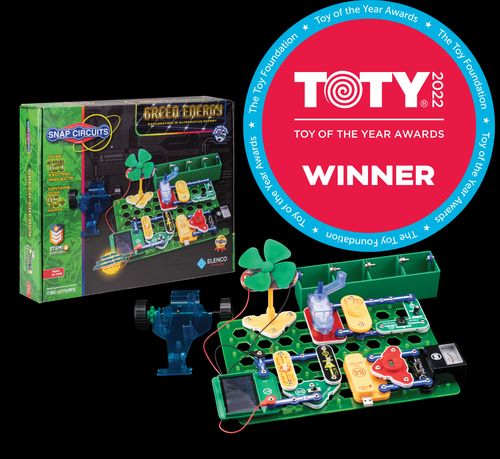
Hands-on logic and electronics
Pros
- ✓ Clear challenge progression
- ✓ High educational value
- ✓ Strong replay
Cons
- ✗ Can frustrate younger kids
- ✗ Needs organization
- ✗ Best with guidance early
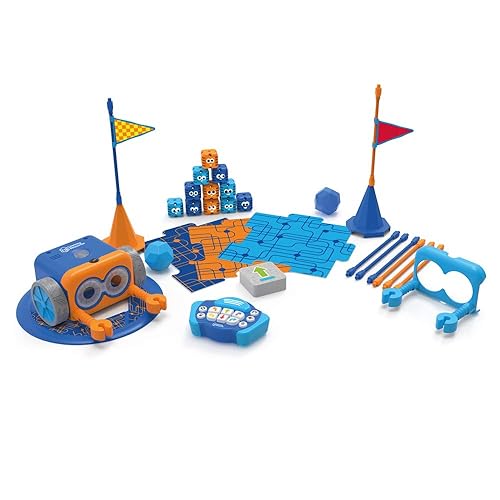
Screen-free coding for young beginners
Pros
- ✓ No screen required
- ✓ Fast feedback
- ✓ Great for beginners
Cons
- ✗ Higher price
- ✗ Can need setup help
- ✗ Small parts
What Makes These Toys Different
Snap Circuits Jr. is an electronics kit. The child follows diagrams, snaps pieces onto a grid, and creates circuits that do something visible: light up, make noise, spin, switch on, or change behaviour when a connection changes. It is not pretending to teach electronics. It gives kids a simplified but real version of how circuits connect.
That makes it a stronger fit for kids who can slow down and follow a visual plan. The payoff is satisfying because the circuit either works or it does not. When it fails, there is usually a reason: a part is reversed, a snap is not fully connected, or the child skipped a step. That troubleshooting loop is where the learning happens.
Botley 2.0 is a coding robot for younger kids. It teaches sequencing by asking the child to choose commands in order before the robot moves. The child predicts a route, sends the command string, watches Botley try it, and then fixes the plan. That is debugging in a very friendly form.
The biggest difference is abstraction. Snap Circuits asks a child to read a diagram and imagine electricity moving through parts. Botley asks a child to imagine a path through space. Both build logic, but they use different parts of the brain. If your child is earlier in the STEM journey, Botley is usually easier. If your child is ready for more patience and detail, Snap Circuits has more depth.
For adjacent options, compare Epic Circuits vs Snap Circuits for kids if you are leaning electronics, or Mech-5 vs Botley for screen-free coding if you are leaning robotics.
First-Session Reality
Snap Circuits works best when the first session is calm and not rushed. Open the kit, choose one simple project, and help your child identify the parts before building. If the pieces are scattered everywhere, the toy can feel more complicated than it is. If the parts are organised, the diagrams become much easier to follow.
The first win is important. Pick a project that turns on quickly rather than jumping to the most impressive build. Kids are more willing to troubleshoot later if they have already seen the system work. After that, you can ask useful questions: "What changed when we moved this piece?" "Why do you think the light stopped?" "Which part controls the switch?"
Botley starts faster. A child can usually understand forward, turn, and go within minutes. The robot gives immediate feedback, and the character design makes mistakes feel less serious. Instead of "you got it wrong," the situation becomes "Botley went the wrong way; let's fix the plan."
Botley still benefits from structure. If the child only drives it randomly, the coding value drops. Set up a tiny route with blocks, paper arrows, or toys as obstacles. Keep early challenges short: two forwards, one turn, goal. Then slowly add steps.
Which Child Will Use Each One More?
Choose Snap Circuits for the child who likes building, experiments, and real-world explanations. It is especially good for kids who ask why things work, enjoy taking apart ideas, or can follow LEGO-style instructions without melting down. It also suits children who are ready for a toy that feels more grown up than character-based preschool STEM.
Snap Circuits can frustrate younger kids because the diagrams require attention. An eight-year-old who likes construction may be ready. A five-year-old who loves robots may not be. If you buy it too early, it can sit unused until the child grows into it.
Choose Botley for the younger child who needs the learning to be more playful. It is a better first step for kids who are curious about coding but not ready for reading-heavy kits or app-based programming. Botley is also useful for kids who need movement. Instead of sitting still with diagrams, they can build a route on the floor and watch the robot move through it.
The tradeoff is depth. Botley is excellent as a beginner coding toy, but many kids eventually outgrow the simple command loop. That is not a failure. It means the toy did its job and prepared them for more complex robotics, coding games, or programmable kits.
Setup, Storage, and Parent Involvement
Snap Circuits needs organisation. The pieces are durable and satisfying, but the kit is much better when parts return to the tray or a dedicated container. If pieces go missing, the project list becomes frustrating. A parent does not need to lead every build, but early help with parts and diagrams can prevent the child from quitting too soon.
Botley needs batteries, floor or table space, and small accessories that should not disappear into a general toy bin. It is easier to start, but not completely hands-off. The adult role is to create small challenges and help the child explain the bug: "Did Botley turn too early?" "Do we need one more forward?" "What should happen before the turn?"
For families trying to avoid extra screen time, both are strong. Botley is more directly connected to screen-free coding. Snap Circuits is more directly connected to electronics and engineering. If screen-free play is the priority more broadly, see screen-free toys for kids and best screen-free toys for rainy days.
Learning Value Over Time
Snap Circuits has the stronger long-term ceiling. The SC-100 projects give kids repeated chances to build circuits, notice patterns, and become more confident with cause and effect. The same child can return months later and understand more than they did at first. That makes it a good toy to rotate back into the house rather than leaving out all the time.
Botley has stronger early engagement. It gives a younger child the feeling of coding before they can handle a more advanced interface. The feedback loop is simple, fast, and friendly. Over time, replay depends on whether you keep changing the challenge. Mazes, treasure hunts, sibling-created routes, and "fix my code" games all help.
The real choice is not "coding versus science" in the abstract. It is whether your child is ready for patient diagram-based experiments or needs a more active route-planning toy.
Final Recommendation
For most eight-year-olds and older kids who like building, Snap Circuits Jr. is the stronger STEM pick. It has more educational depth, more replay, and a clearer bridge into electronics.
For younger kids, Botley 2.0 is the better first coding toy. It is more approachable, more playful, and easier to use in short sessions without a screen.
FAQ
Which one is easier to start with?
Botley 2.0 is usually easier to start with because the command-and-move loop is immediate. Snap Circuits Jr. is straightforward for the right age, but it asks for more patience and diagram reading.
Which one teaches coding better?
Botley teaches coding concepts more directly: sequencing, direction commands, prediction, and debugging. Snap Circuits teaches logic and cause-and-effect, but its main subject is electronics.
Which one has more long-term depth?
Snap Circuits Jr. usually has more long-term depth because the projects build real circuit understanding. Botley is excellent for early coding confidence, but many kids will eventually want a more advanced robot or coding platform.
Can a younger sibling use either toy?
A younger sibling can often enjoy Botley with supervision. Snap Circuits is better saved for kids who can avoid mouthing pieces, follow diagrams, and handle small parts responsibly.
Should I buy both?
Not at first. Start with the learning style that fits your child now. Add the other later if your child shows real interest in both coding robots and electronics.
Where to Go Next
Want better toy picks without the research rabbit hole?
Get concise recommendations by age, need, and budget.
Where to go next
By age
Best Toys for 4-Year-Olds (Learning Through Play) (2026)
Keep the recommendations age-appropriate for your kid’s stage.
By need
Gifts for Neurodivergent Kids: A Parent's Guide (2026)
Jump to picks focused on ADHD, sensory, and regulation support.
By budget
Best Gifts for Kids Under $25 (2026)
Compare strong options in lower price brackets before you buy.
Related Articles

Best Screen-Free Math Toys for Preschoolers
Hands-on math toys that help preschoolers practise counting, comparison, patterns, and early problem solving without screens.
Read more →
Best Quiet Logic Toys for Apartments
Low-noise logic toys for apartment play, quiet rooms, and families who need thinking practice without chaos.
Read more →
Monster Scale vs Mental Blox for Early Logic
A comparison for families choosing between early math comparison play and spatial logic challenges.
Read more →