Best Low-Prep STEM Toys for 7-Year-Olds
Fast-start STEM toys for 7-year-olds with low setup friction and strong replay value.

Snapshot
| Toy | Age | Price | Best for | Link |
|---|---|---|---|---|
| #1 ThinkFun Roller Coaster Challenge | 6+ | CAD $45–$70 | Engineering logic through build-and-test coaster puzzles | Check Price |
| #2 Learning Resources Mental Blox Critical Thinking Game | 5+ | CAD $35–$55 | Spatial logic, following directions, and co-solving | Check Price |
| #3 Educational Insights Artie 3000 The Coding Robot | 7+ | CAD $60–$80 | Drawing-based robot coding with block and text pathways | Check Price |
| #4 Educational Insights BrainBolt Boost | 5+ | CAD $30–$45 | Instant-start memory and pattern play | Check Price |
Affiliate links. Prices can change.
Seven-year-olds are in a useful STEM window: old enough to follow multi-step rules, still young enough to learn through trial and error, and easily derailed if the first session feels like schoolwork. The best low-prep STEM toys for this age do not require a parent to read a long manual, charge three devices, or build half the activity before the child can begin.
This guide is for real weeknights, not perfect playroom photos. These picks favour fast setup, visible feedback, and challenge systems that can be reused in short sessions. If your child likes building, puzzles, robots, or cause-and-effect experiments but gets impatient with open-ended kits, start here.
ThinkFun Roller Coaster Challenge
The clearest build-test-rebuild loop for 7-year-olds who want engineering play without a huge parent setup burden.
Quick Answer
For most 7-year-olds, ThinkFun Roller Coaster Challenge is the strongest low-prep STEM pick because the goal is visual, the pieces feel exciting, and the challenge cards give structure without turning play into a worksheet. If your child does better with quiet tabletop logic, Mental Blox or Rush Hour Junior will usually be easier to start. If they are ready for a device-supported coding toy, Artie 3000 has the best creative payoff, but it needs more adult setup than the others.
What Low-Prep STEM Means at Age 7
Low-prep does not mean shallow. It means the first five minutes are obvious enough that a tired parent can say, “try this card,” and the child can start before motivation evaporates. At seven, that usually means:
- A clear first challenge. The toy should show what to build, solve, remember, or test.
- Visible feedback. A marble rolls, a car escapes, a robot moves, or a pattern lights up.
- Small resets. The child can try again without rebuilding the entire toy.
- A challenge ladder. The toy should get harder in a predictable way.
- Manageable pieces. More pieces can mean richer play, but only if storage is realistic.
If your child is still building stamina for harder STEM play, pair one focused toy from this list with a movement break. Our guide to best toys for focus breaks between homework is a good companion if STEM time often happens after school.
Our Top 6 Picks
Engineering logic through build-and-test coaster puzzles
Pros
- ✓ Clear challenge progression
- ✓ Great cause-and-effect feedback
- ✓ Stronger novelty than another circuit kit
Cons
- ✗ Pieces need organization
- ✗ One-player-at-a-time tendency
- ✗ Harder cards may need help
Spatial logic, following directions, and co-solving
Pros
- ✓ Good group/sibling play
- ✓ Strong spatial reasoning
- ✓ Low-tech and classroom-friendly
Cons
- ✗ Requires reading or verbal prompts
- ✗ Pieces can scatter
- ✗ Less flashy as a gift
Drawing-based robot coding with block and text pathways
Pros
- ✓ Real coding payoff
- ✓ Creative drawing output
- ✓ Multiple coding modes
Cons
- ✗ Needs a device
- ✗ Older beginner fit
- ✗ Requires paper and marker setup
Instant-start memory and pattern play
Pros
- ✓ No pieces to manage
- ✓ Fast solo turns
- ✓ Good visual memory reps
Cons
- ✗ Electronic sound/light toy
- ✗ Needs batteries or charging
- ✗ Less open-ended than build toys
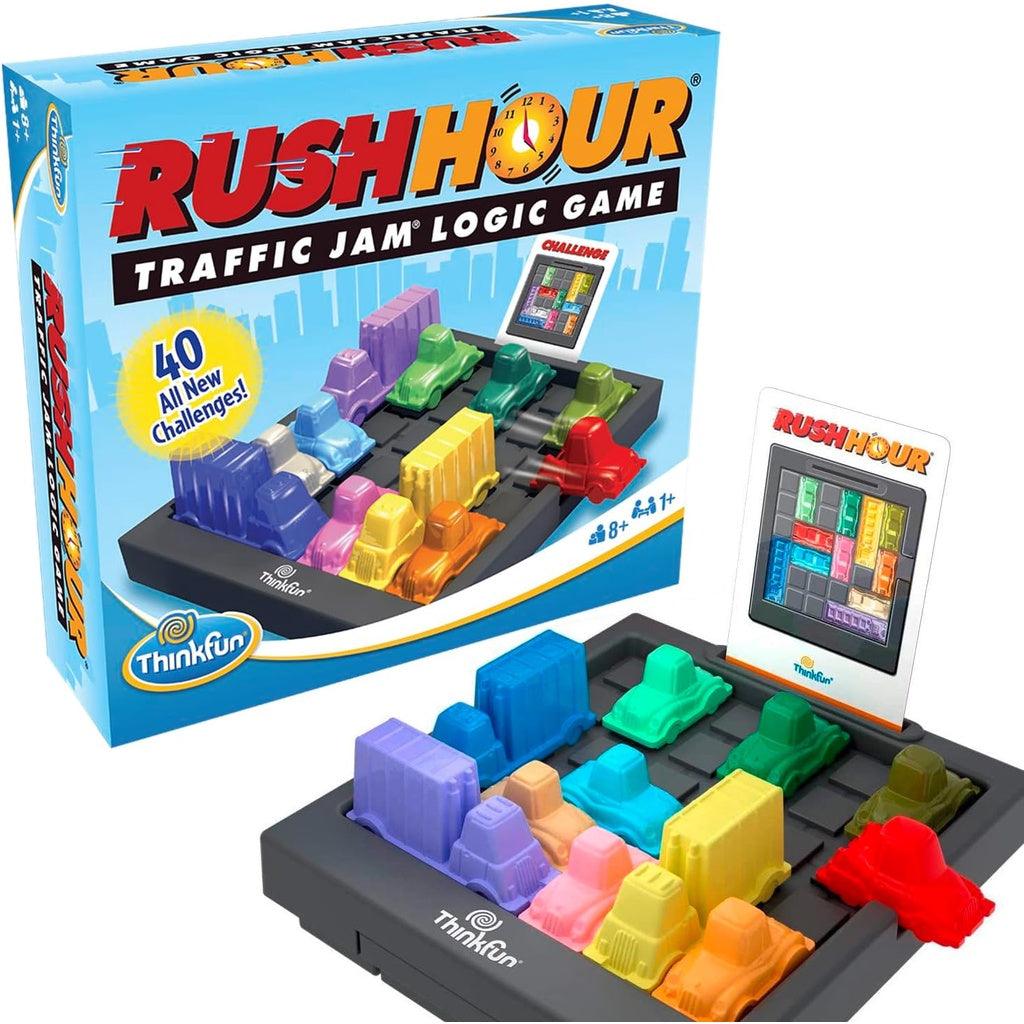
ThinkFun Rush Hour Junior
Fast-start traffic-jam logic puzzles
Pros
- ✓ Very low setup
- ✓ Clear challenge cards
- ✓ Good early logic practice
Cons
- ✗ Single-player
- ✗ Can feel repetitive
- ✗ Limited collaborative play
Simple screen-free sequencing and robot movement
Pros
- ✓ No screen required
- ✓ Clear command-and-test loop
- ✓ Affordable Botley-style entry point
Cons
- ✗ Needs batteries
- ✗ Less complete than the full activity set
- ✗ Best with added DIY paths or obstacles
Why These Picks Made the List
ThinkFun Roller Coaster Challenge
This is the best fit when a 7-year-old wants building play but still needs structure. The card shows a target layout, the child places track pieces, and the marble either makes it through or does not. That physical feedback is what makes it feel like engineering instead of a worksheet.
The main household issue is piece management. Use a shallow tray or zip pouch for supports and tracks, and keep only the current challenge card out. It is also more solo than social, so it works best as a focused station rather than a sibling-sharing toy.
Learning Resources Mental Blox Critical Thinking Game
Mental Blox is quieter and more collaborative. A parent, sibling, or prompt card gives a pattern, and the child has to recreate it with 3D blocks. That makes it useful for spatial reasoning, direction-following, and slowing down long enough to compare details.
Choose this over Roller Coaster Challenge if your child likes talking through puzzles or gets frustrated when physical builds collapse. Skip it if your child strongly dislikes verbal instructions; the toy works best when someone is willing to read or describe the challenge.
Educational Insights Artie 3000 The Coding Robot
Artie 3000 has a bigger payoff: the robot draws the code. For a 7-year-old who is curious about coding but bored by abstract screen lessons, that creative output can be motivating. It also gives a natural reason to test, revise, and try again.
The tradeoff is setup. You need paper, markers, a device, and a little patience. This is not the lowest-friction pick for a chaotic weeknight, but it is a strong weekend STEM toy for kids who want a real project. For more robot choices, see best first robot toys for curious kids.
Educational Insights BrainBolt Boost
BrainBolt Boost is the easiest instant-start option here. There are no loose pieces, no build space, and no parent explanation beyond “repeat the pattern.” That makes it useful for quick memory practice before dinner, in a waiting room, or during a homework reset.
It is less open-ended than the building toys, so do not expect it to anchor a whole afternoon. Its strength is fast repetition, visual memory, and a satisfying little challenge loop.
ThinkFun Rush Hour Junior
Rush Hour Junior is a classic low-prep logic puzzle because each card creates a contained problem. A 7-year-old can set up a traffic jam, slide pieces, and know exactly when the puzzle is solved. It is calmer than many STEM toys and easier to store than a large build kit.
It can become repetitive if your child burns through cards quickly. If that happens, rotate it with other quiet logic toys or move up to a harder ThinkFun puzzle. For a direct comparison, read Mental Blox vs Rush Hour Junior for logic skills.
Learning Resources Code & Go Robot Mouse
Code & Go Robot Mouse is a gentle first sequencing toy. Kids press directional commands, predict a path, and test whether the mouse reaches the goal. It is especially good for children who need to see code as movement before they understand code as symbols.
Because this version is simpler than a full activity set, it benefits from homemade obstacles. Tape a small maze on the floor, add paper tunnels, or draw a start and finish line. That keeps replay value higher without adding much cost.
How to Choose the Right One
If your child loves building, start with Roller Coaster Challenge. If they like puzzles but do not want a big construction mess, choose Rush Hour Junior. If they like copying patterns and working with someone else, choose Mental Blox. If they want a creative coding project and you can tolerate device setup, choose Artie 3000.
For families buying on a tighter budget, BrainBolt Boost or Rush Hour Junior are easier bets than a larger robot kit. For more price-conscious options, compare this list with best STEM toys under $40 for kids.
Setup Tips That Actually Help
1) Make a first-session card stack
Pull out three easy cards before giving the toy to your child. Early success matters more than showing the full challenge deck.
2) Store by activity, not by box
If a box is bulky, move pieces into labelled pouches. Low-prep toys stop being low-prep when the storage system is annoying.
3) Use short STEM blocks
A 15- to 25-minute session is enough. End while the toy is still working instead of waiting for frustration.
4) Keep one “no pieces” STEM option
A toy like BrainBolt Boost is useful when you need STEM-ish thinking without cleanup. It will not replace building toys, but it saves tired evenings.
Want better toy picks without the research rabbit hole?
Short, practical recommendations by age, need, and budget.
FAQ
Are these toys too easy for a 7-year-old?
Not if you match the toy to your child’s tolerance for challenge. Rush Hour Junior and BrainBolt Boost are lower-friction; Roller Coaster Challenge and Artie 3000 offer more stretch.
Do low-prep STEM toys still teach real STEM skills?
Yes, when they include prediction, testing, sequencing, spatial reasoning, or cause-and-effect. The key is not how technical the toy looks; it is whether the child has to think, try, observe, and revise.
What if my child gets frustrated quickly?
Start with the easiest cards, sit nearby for the first win, and stop after a short successful session. For frustration-prone kids, easy science toys for kids who get frustrated fast has more forgiving options.
Related reads
- Best STEM Toys for Kids Who Hate Worksheets
- Best Coding Toys for Kids
- Roller Coaster Challenge vs GraviTrax for Engineering Kids
If You Can Only Buy One
ThinkFun Roller Coaster Challenge. It gives 7-year-olds the best balance of engineering feel, clear feedback, challenge progression, and realistic family setup.
Want better toy picks without the research rabbit hole?
Get concise recommendations by age, need, and budget.
Where to go next
By age
Best Homework Break Toys for 7-Year-Olds
Keep the recommendations age-appropriate for your kid’s stage.
By need
Gifts for Neurodivergent Kids: A Parent's Guide (2026)
Jump to picks focused on ADHD, sensory, and regulation support.
By budget
Best Gifts for Kids Under $25 (2026)
Compare strong options in lower price brackets before you buy.
Related Articles

Best Screen-Free Math Toys for Preschoolers
Hands-on math toys that help preschoolers practise counting, comparison, patterns, and early problem solving without screens.
Read more →
Best Quiet Logic Toys for Apartments
Low-noise logic toys for apartment play, quiet rooms, and families who need thinking practice without chaos.
Read more →
Monster Scale vs Mental Blox for Early Logic
A comparison for families choosing between early math comparison play and spatial logic challenges.
Read more →